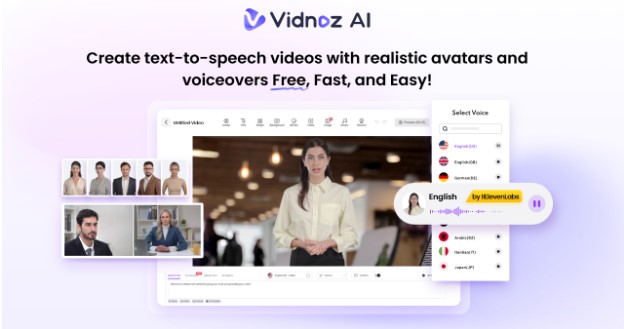
Social media content is a powerful way to attract, engage, and delight your target audience. The key is creating relevant, high-quality content that resonates with your followers, encourages interaction, and builds trust. However, producing engaging posts can be time-consuming and overwhelming. That’s where Vidnoz AI comes in. This tool streamlines the entire content creation process, allowing you to generate videos quickly. In this guide, we will provide a complete overview of Vidnoz AI, including its key features, benefits, drawbacks, and how to use it.
Part 1: Introduction to Vidnoz AI
Looking for a way to boost your reach by 300%? Vidnoz AI is the best option. It is an all-in-one AI Video Generator that allows users to create high-quality content within seconds. With the help of this tool, users can produce various types of videos, including how-to guides, tutorials, short reels, and more. The best part of this tool is that it’s free and safe to use. Vidnoz AI is certified with ISO/IEC 27001:2022 for Information Security Management. In addition, Vidnoz AI offers various AI tools, including AI Video Generator, Text-to-Video, AI Video Enhancer, Online Video Editor, and more. These tools simplify every step of content creation, from scripting and editing to final production.
Part 2: Key Features That Boost Your Reach by 300%
Vidnoz AI’s main features are the key to success behind this tool, allowing users to create high-quality content quickly and efficiently. Here are some of the amazing features of this tool that boost your reach by 300%:
1. Pre-Designed Templates

Vidnoz AI offers 2800+ customizable templates, allowing users to create various types of videos with a single click. Simply select the template and begin the video creation process. It includes pre-built templates of how-to guides, product demos, social media, breaking news, and more. Users can also use custom templates to accelerate the brand video creation.
2. High-Quality Voices

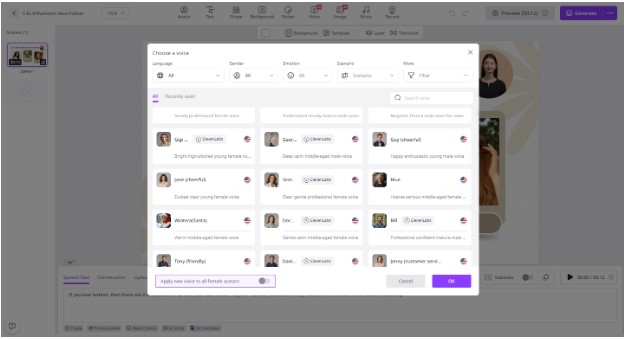
Another amazing feature about Vidnoz AI is its AI voices. The program includes 1830+ AI voices, each with a unique accent and style. All the voices available on this program are powered by ElevenLab, Google, and Microsoft. Vidnoz AI offers AI voices of celebrities, cartoon characters, politicians, anime, and more.
3. Lifelike AI Avatars

This program includes 1700+ lifelike avatars from different industries and roles, such as doctors, hosts, customer support, chiefs, teachers, and more. In addition to a library of realistic avatars, users can create their digital twin using Avatar Lite, and Avatar Pro enables you to customize Avatars according to their requirements.
4. AI Video Wizard
Anyone can generate high-quality videos with Vidnoz AI. The program AI Video Wizard enables users to create high-quality videos with Vidnoz AI via a simple text prompt or any source material.
5. Free Version
The standout feature of this program is that it offers a free version, allowing users to create a 2-minute video daily for free. The free version of this program offers amazing features, such as AI Text-to-Video, Avatar Lite, AI Voice Changer, AI Headshot Generator, and more.
Part 3: Benefits and Drawbacks of Using Vidnoz AI
Vidnoz AI includes hundreds of benefits when it comes to video creation. However, it still has some limitations that you want to know about. Here are the top benefits and limitations of Vidnoz AI:
Benefits
- Offering over 1700 lifelike avatars, 2800 pre-designed video templates, and an extensive selection of 1830+ realistic AI voices across multiple languages and styles.
- Web-based tool, meaning it requires no software downloading or installation. Runs on any device with a stable internet connection.
- User-friendly interface, which is best for non-tech and beginner users. Users can create high-quality videos without editing experience.
- Includes a wide range of assets that can be used in videos, such as images, music, icons, and text.
- Allows users to generate images with a simple text prompt. Supports a variety of artistic styles, including realistic, flat, illustration, 3D cartoon, anime, and more.
Drawbacks
- Requires a stable and active internet connection to generate videos. Without an internet connection, you won’t be able to generate videos with this tool.
Part 4: How to Generate Videos With Vidnoz AI?
Follow the instructions below to generate videos with Vidnoz AI with a simple text prompt or any source material:
- Navigate to Vidnoz AI’s official site and click on the “Create Free Video Now” button. Choose a video template and an AI avatar.
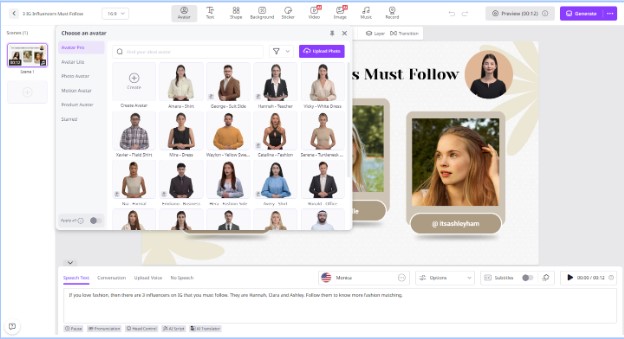
- Input text and select an AI voice. Users can also choose the language of their video as Vidnoz AI offers 140+ languages.
- Next, use the Online Video Editor to customize it. You can adjust the background, add text, and insert music.

- In the end, click on the “Generate” button to begin the video creation process. Within seconds, your video will be ready.
Conclusion
Vidnoz AI is a powerful tool that simplifies content creation and boosts social media reach by 300%. In this guide, we have mentioned everything about this amazing tool that will help you boost social media reach in seconds.